

Why Security Camera Installation Matters in Glen Waverley
From what I’ve seen, Glen Waverley’s leafy streets & family‑friendly vibe attract a lot of foot traffic, which is great for community spirit but also means more eyes on your property. A solid security camera setup can deter opportunistic thieves & give you peace of mind when you’re out at the local Westfield or hitting the beach up north. The thing is, a camera that’s installed right will actually record what matters – the front gate, the back garden, and that spare bike you keep in the shed.
In my experience neighbours in the suburb often share footage when a break‑in occurs and that collaborative vibe can be a real lifesaver. It’s not just about catching a crook; it’s about protecting your kids your pets and your hard‑earned belongings. When you’re Planning a DIY security camera installation Think about the local climate – we get occasional heavy rain & strong sun so you need gear that can handle that — And that matters because a camera that fries in a storm won’t do you any good.
Planning Your DIY Security Camera Installation
Here’s what I tell people: Start with a quick walk‑around of your house at night & note the dark spots where a burglar could slip in. Map out where you want the lenses to face – usually the front door, driveway, and any side alleys — Write down the power sources you have nearby; a lot of Aussie homes still use ceiling light circuits, which can be a handy feed for wired cameras. The plan should also include where you’ll run the cable, especially if you’re doing a home surveillance system wiring job yourself.
What typically happens is people rush into buying gear without checking the Wi‑Fi coverage. A suburb like glen waverley, the router might be tucked away in the living room, and the signal can drop off by the back fence. So, test the signal first, or consider a wireless security camera setup that can talk to a repeater. Knowing the layout and the signal strength before you drill holes saves you a lot of re‑work later on.
Choosing the Right Gear for Australian Homes
When you shop for cameras down look for units rated IP66 or higher – that’s the Aussie standard for dust & water resistance. A lot of people ask me this: “Do I need a night vision camera?” Absolutely because we get long summer evenings and short winter nights. Pick a model with infrared LEDs that can see at least 10‑15 metres in the dark. And if you want a cleaner look go for a bullet‑style camera for the front door & a dome for the side yard.
Another thing to consider is the power option. Some folks love PoE – power over ethernet – because it halves the number of cables you need to run. A power over ethernet (PoE) installation is neat but you’ll need a PoE switch which adds a bit to the cost. If you’re on a tighter budget a solar‑powered wireless camera can work well on the rear fence just make sure the panel gets enough sun. The key is matching the gear to the local conditions & your budget.
Wiring and Power Options for Security Camera Installation
DIY security camera wiring guide for Aussie houses usually starts with turning off the circuit at the breaker – safety first. To be honest, run a cat6 cable from your router or poe switch to each camera location; cat6 handles both data and power for poe cameras and keeps the signal strong — If you’re using a traditional CCTV system, you’ll need a 12‑V transformer & a separate power cable for each camera. Keep the cable in a conduit to protect it from the occasional bushfire smoke and UV exposure.
Interestingly, many homeowners in Glen Waverley opt for a hybrid approach: PoE for the main cameras and a wireless backup for the garage. That way, if one cable gets damaged in a storm, you still have coverage. When you’re routing the cable, avoid running it parallel to high‑voltage lines – that can cause interference. And always label both ends; you’ll thank yourself when you’re troubleshooting later.
Mounting & Placement Tips for Outdoor CCTV in Glen Waverley
Outdoor CCTV mounting is all about getting a clear line of sight while staying out of reach of vandals. For the front porch mount the camera about 2.5‑3 metres high on the wall angled down just enough to cover the door and the footpath. Use a sturdy bracket with tamper‑proof screws – a lot of burglars will try to unscrew a cheap mount — In the backyard position a camera near the fence line to watch over the garden and any pool area you might have.
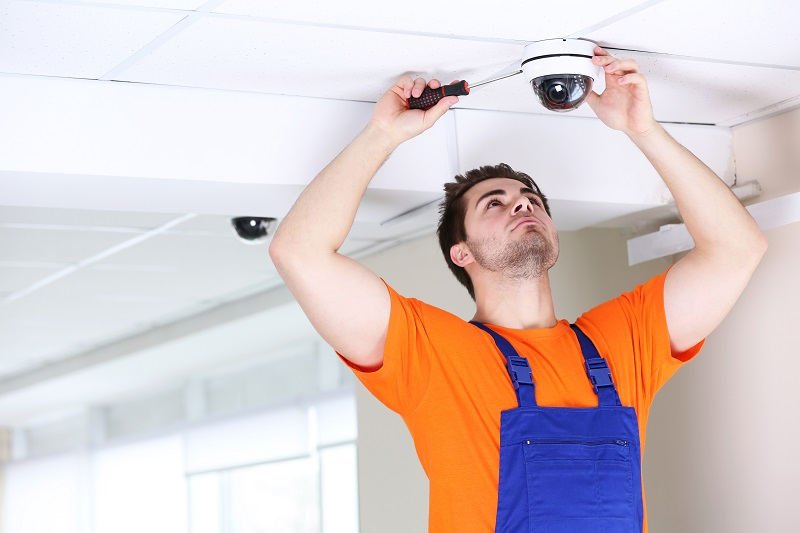
Don’t forget about motion detection sensor placement. Position the sensors where they’ll pick up a person walking, but not a passing car, to reduce false alerts. A good spot is near the driveway entrance, aimed at the footpath — And if you have a driveway gate, a camera there can capture the licence plates of visitors. Remember to angle the lens slightly outward to avoid glare from the sun, especially on the east‑facing side of the house.
Connecting to Wi‑Fi and Configuring IP Cameras
Once the cameras are mounted, it’s time for the wireless security camera setup. Open the app on your phone, follow the on‑screen QR code scan, and link each camera to your home Wi‑Fi network. In a Glen Waverley house, you might have a dual‑band router; stick to the 2.4 GHz band for better range, especially if the camera is far from the router. After connection, run through the IP camera configuration – set a strong password, enable encryption, and adjust the motion zones.
And that matters, you’ll want 2 set up push notifications for any movement detection. Most apps let you customize the sensitivity, so you can ignore the neighbour’s dog but still get an alert if someone lingers near the back gate. If you’re using a PoE switch, you can also enable remote viewing over the internet. Just make sure you forward the right ports on your router for secure remote access.
Testing, Adjusting, & Maintaining Your Home Surveillance System
After everything’s hooked up, do a full walk‑through test. Check the live feed on your phone, walk through each camera’s field of view, and verify the motion detection triggers as expected. If you notice blind spots, adjust the tilt or add an extra unit. In my experience, a quick test after installation catches most issues before you forget about them.
Maintenance is simple but essential. Clean the lens with a soft cloth every few months – dust and pollen from the local gardens can blur the image — For wired cameras, inspect the conduit for any wear, especially after a heavy rain. And every year, check the firmware updates in the app; they often patch security holes. A well‑maintained system will keep your home safe for years to come.
Essential Tools Checklist for DIY Security Camera Installation
- Drill with masonry bits (for brick walls)
- Level and measuring tape
- Cat6 cable and RJ45 connectors
- PoE switch or 12‑V transformer (depending on camera type)
- Stainless‑steel mounting brackets and tamper‑proof screws
- Multimeter for checking voltage
- Smartphone with the camera’s app installed
Local Permits and Regulations in NSW…
What typically happens is people assume they can just slap a camera on any wall, but NSW does have some rules. For most residential properties in Glen Waverley, you don’t need a council permit if the camera is aimed at your own property. However, if you plan to point it toward a public footpath or neighbour’s yard, you might need to check the local council’s privacy guidelines. It’s a quick phone call to the City of Monash planning department, and you’ll avoid any legal headaches.
Honest advice: Keep the cameras focused on your own house and driveway if you need to monitor a shared driveway, talk to the other owners & get written consent. That way, you stay on the right side of the law and keep good neighbourly relations. And if you ever sell the house, a well‑documented security system can be a nice selling point.
Final Thoughts on DIY Security Camera Installation in Glen Waverley
In my experience, a well‑planned DIY Security camera installation Not only boosts safety but also adds value to your home — It’s a project you can finish in a weekend, and the sense of control you get is worth the effort — Remember to plan the layout, choose weather‑proof gear, run the wiring neatly, and test everything before you call it a day. With the right steps, you’ll have a reliable home surveillance system that works through the Aussie summer heat and winter chill.
And that’s the bottom line – if you follow this guide, you’ll have a solid security camera installation that protects your Glen Waverley home without breaking the bank. Ah, keep an eye on the weather, keep the firmware up to date, and you’ll sleep soundly knowing your property is under watch. Happy installing!